Enhancements to the Benefits and Pay Hub
With the March 2025 Feature Release, Workday rolled out enhancements to the user experience in the Benefits and Pay hub.
These enhancements improve accessibility and visibility to employee benefit and pay information as well as centralized actions such as viewing or editing tax, withholding, and payment elections. They include:
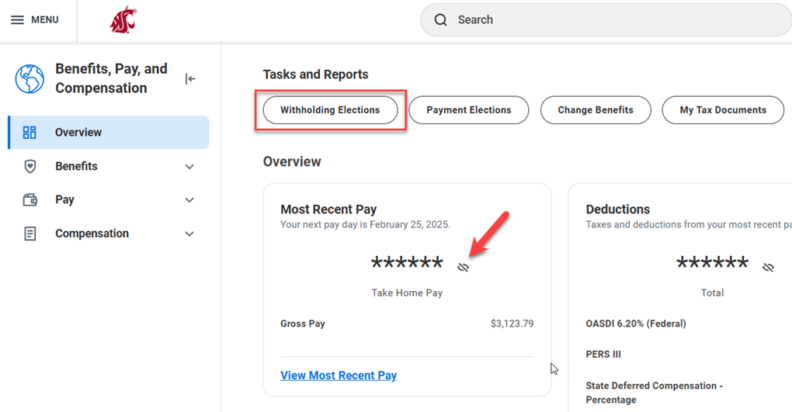
- When interacting with the Overview tab in the Benefits and Pay hub, Workday now automatically hides financial values that are displayed in large font. This enhances data privacy and sensitive financial information. This information can be revealed by selecting the eye icon.
- A new Withholding Elections button is now available above, which navigates to the Worker Tax Information page where withholding elections may be completed.
- On the Worker Tax Information page, two new buttons are available which navigate to the standalone tasks for Completing Federal and State Elections. Worker with more than one position will see a Switch Positions button displaying tax elections for each respective position.
- Please note: It is not recommended to utilize this feature as tax elections apply to individual employees as workers, not by position.
If you have any questions, please reach out via the Workday Service Desk.
This update is part of the March Feature Release. You can learn more about Feature Releases and what to expect by visiting the Feature Release Hub on the Modernization website.