New Pre-Hire search and ‘Hire Employee’ interface
Beginning Tuesday November 4, individuals who initiate the ‘Hire Employee’ business process will see changes to the user interface that improve the experience of searching for existing person records, as well as changes to the Hire interface.
Those with the Manger or HR Partner security roles should be aware of the following updates:
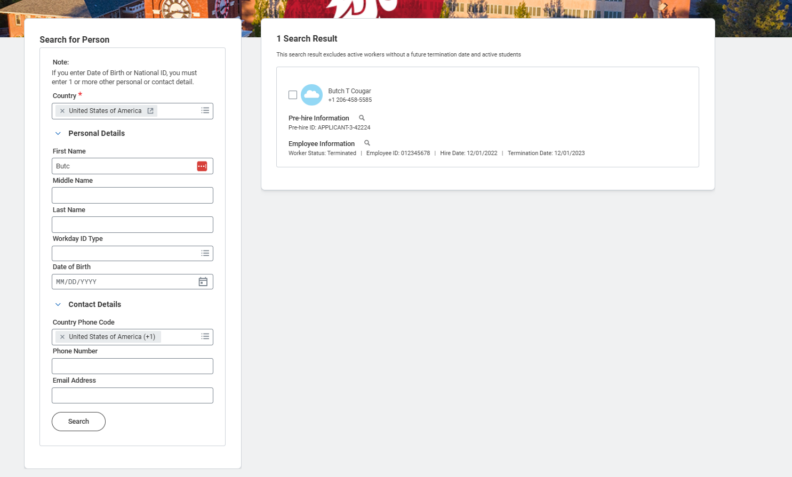
Searching for a Pre-Hire record
Previously, the Hire Employee process only allowed searches by name, which led to incorrect records being used for the Hire.
Now, users will be able to search for existing Pre-Hire records by name, WSU ID, date of birth, and contact information.
Search Results
If the data is available, the results from a Pre-Hire search will show the individual’s name, phone number, Employee ID (WSU ID), and the dates of their last Hire and Termination.
Although users may still search by a person’s date of birth and see matching results, the date of birth is not displayed in the results.
NOTE: Search results will only show available Pre-Hire records that can be used. If an individual is an active employee, or their Pre-Hire record is being used in an ‘in progress’ Hire, users will not see the Pre-Hire in the search results.
Hire Interface
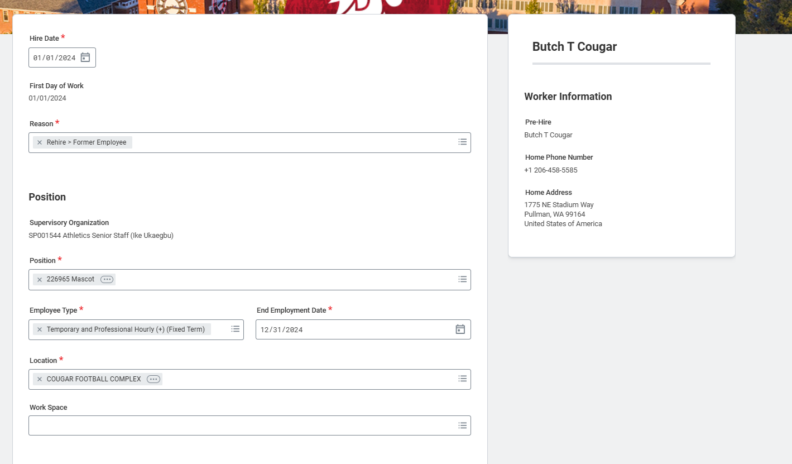
After selecting an existing Pre-Hire record, or creating a new one, the Hire event layout will be noticeably different.
The right side of the screen will display additional information on the Pre-Hire. As of now, this is limited to the name, phone number, and address (if available) but we will continue to work on making more helpful information available.
The Hire Reference Guide will be updated with new instructions and screenshots. Please reach out to the Modernization Team with questions or concerns.