FMLA balance now visible in Manage Absence calendar
The Family Medical Leave Act (FMLA) rolling year entitlement balance is now accessible in the Manage Absence calendar by employees, their supervisors, and HR partners.
To find this feature, navigate to the Leave Results report or the Manage Absence calendar and view “Upon approval by HRS: Family Medical Leave (FMLA) rolling year balance (unpaid)” in the balance section of the calendar. All employees, regardless of their FMLA eligibility, are able to see this field.
This feature assists FMLA approved employees, along with their supervisors and HR partners, in managing employees’ leave of absence time/time offs, and accurately tracking FMLA rolling year entitlement by submitting time-off requests “tagged” as FMLA.
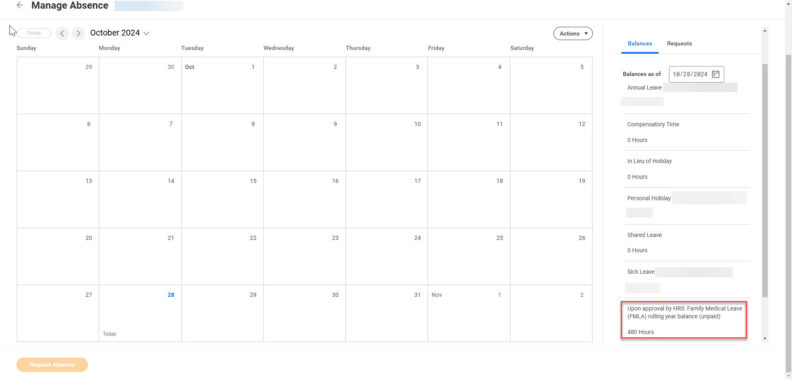
For information about FMLA eligibility, see the HRS Disability Services website. The following FMLA-related resources are also available:
Pregnancy and Parental Resource Guide.
Reasonable Accommodation Resource Guide
Questions? Reach out via the Workday Service Desk.