Share your Adaptive Grants Forecasting personal Scenarios
A new feature in Adaptive Grants Forecasting allows users to share scenarios, making it easier for Grant Managers and Principal Investigators to collaborate on projected grant balances.
Scenarios allow users to create personal grant forecast versions that are not visible to others. Each user may create up to 15 scenarios at a time. Personal Scenarios are automatically moved under the current Grants Forecasting Version during each monthly refresh.
Grant Managers can now share their personal Scenarios with other Adaptive Planning users, enabling collaboration outside the base version when needed.
To Share a personal Scenario:
- In Adaptive Planning, navigate to Personal Scenarios from the menu
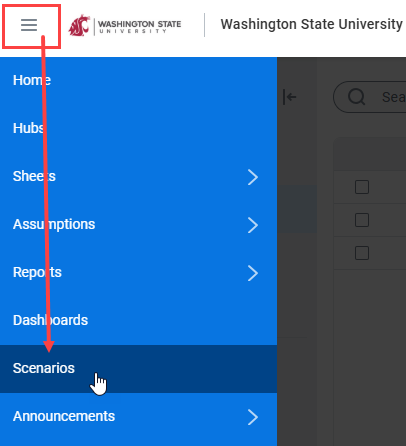
- Locate the scenario you want to share, select the Actions button on the right side of the scenario row, and choose Share.

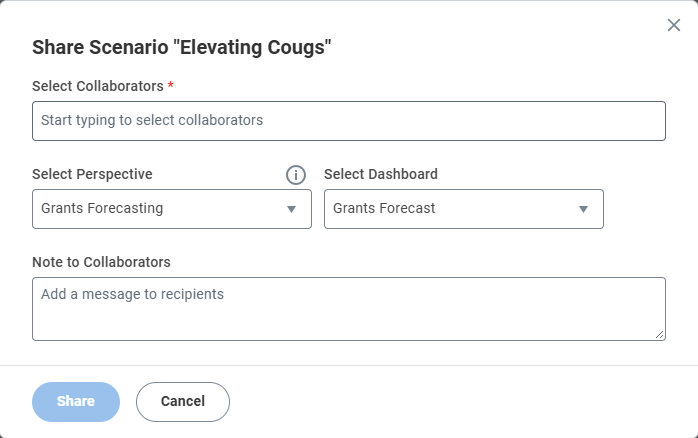
- Select the collaborators you would like to share with. Ensure Grants Forecasting is selected in the Perspective dropdown, then optionally select an appropriate Dashboard tab and add a Note for your collaborators.
- Select Share to grant access.
Questions? For assistance, please reach out via the Workday Service Desk.