New Simplified Search feature now available in Workday
A new Simplified Search feature is now available in Workday. By turning on the optional Simplified Search toggle, located at the top of the search results page in Workday, users can enable a streamlined, search experience.
Simplified Search organizes search categories into buttons at the top of the results page, rather than the lefthand side, allowing users to navigate between search categories more quickly, including Top Results, People, Tasks and Reports, and All Categories.
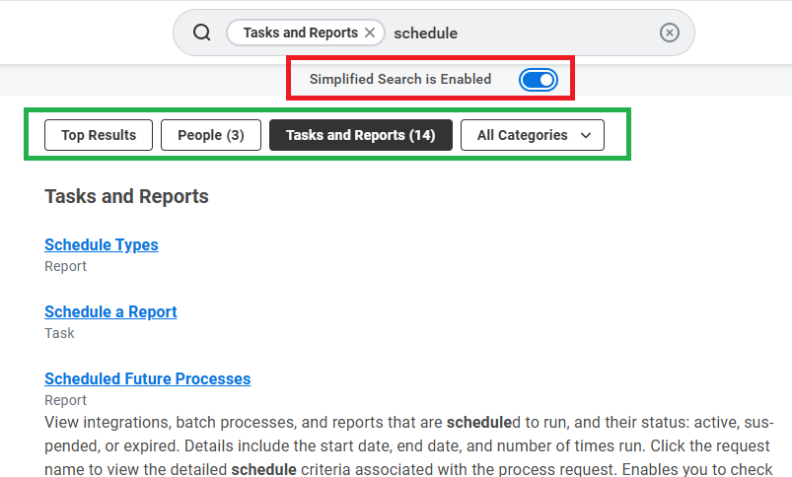
The new All Categories dropdown menu in Simplified Search provides a comprehensive list of available search categories. Employees may edit these categories by selecting ‘Edit Category Preferences’ at the bottom of this dropdown menu.
Simplified Search removes the More Categories, Configure Search, and View Search Tips options from the bottom left of the search results page. By deselecting the Simplified Search toggle, employees can easily return to the regular Workday search page, where these buttons are still available.
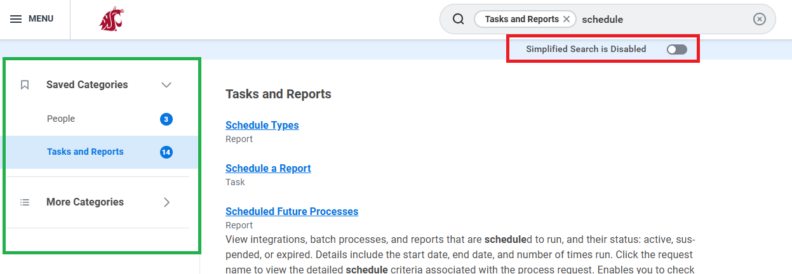
Simplified Search is available to all WSU Workday users who wish to enable the functionality and may be turned on and off as desired. For more information about how to use Workday search, visit this reference guide.
Questions or concerns regarding these new features may be submitted via the Workday Service Desk.